24 October 2026 · 25 min read
Building Environmental Controls as a smarter thermostat for our home
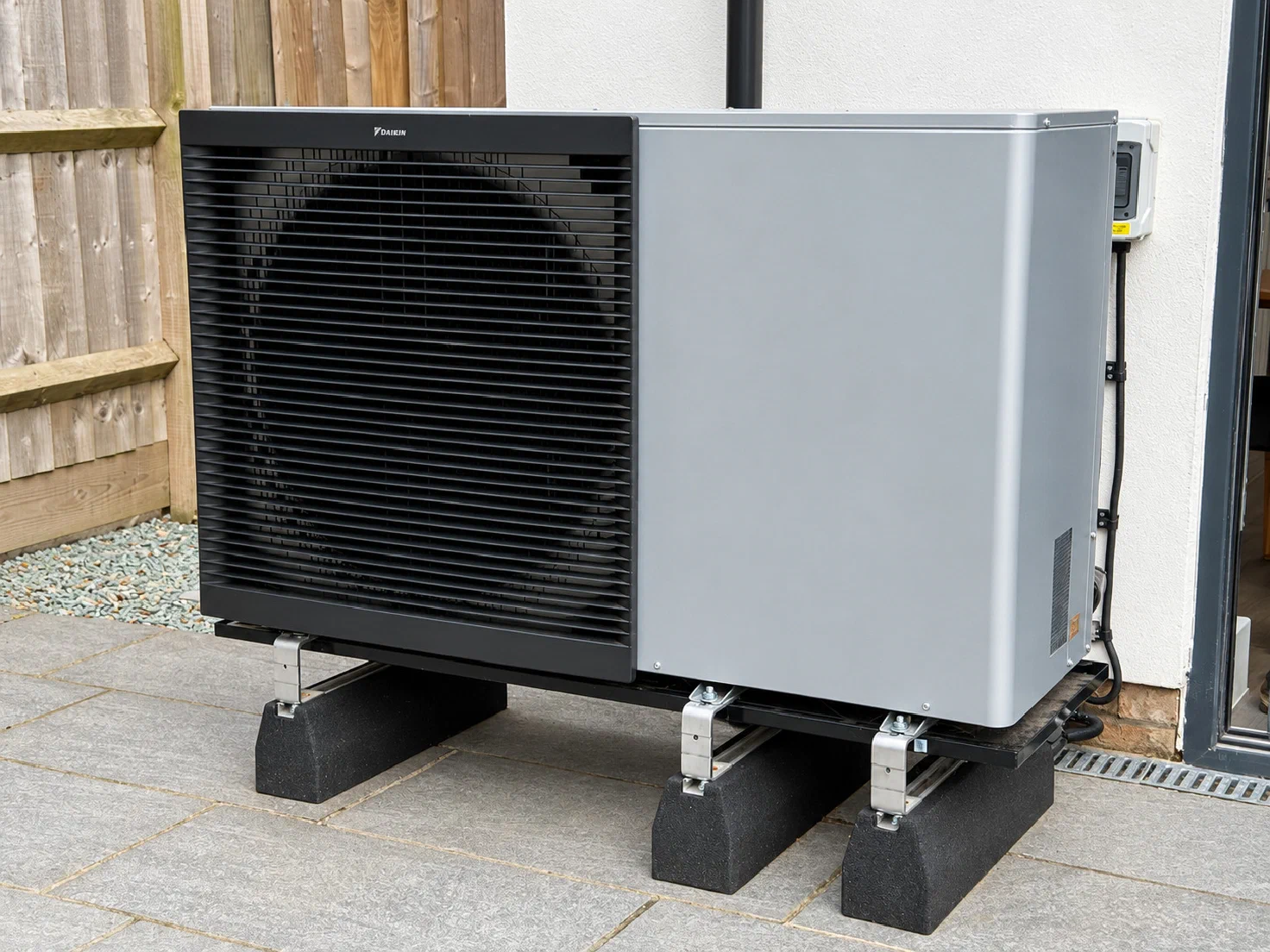
An experiment in using AI and Codex to build a smarter thermostat, with sensors to observe the results and software that can influence how our home is heated and cooled.
On this page
I’ve been experimenting with giving AI a problem to solve in the real world: keeping our home comfortable. What interests me is giving it both a way to observe the results and a way to influence what happens next, then using that feedback to improve the solution.
The house’s temperature sensors provide the observations: how rooms warm up, cool down and retain heat. Home Assistant provides the means to influence those conditions, through the room temperature target of our air-to-water heat pump and the controls for our air-to-air heat pumps.
The link between those observations and actions is Environmental Controls, the Home Assistant app I’m building with AI, particularly Codex. Codex helps me develop and refine the software; the running app reads the sensors and carries out the permitted heating and cooling adjustments, within its configured limits. I can then work with Codex to examine what happened and improve the implementation. That’s the experiment: a feedback loop between the software we’re building and how the house actually behaves.
Underfloor heating makes this an interesting problem. Reducing the target doesn’t remove the warmth already stored in the floor. By the time the air feels warm enough, there may still be plenty of heat making its way into the room. Understanding that behaviour should help the software make better decisions about when to heat, when to wait, and when to start easing back.
Bringing the heating systems together
Our Home Assistant runs on a single Raspberry Pi 4. It brings together the integrations for our Daikin air-to-air and air-to-water heat pumps, the WarmUp underfloor heating thermostats, and various other temperature sensors around the house.
Octopus Energy installed our Daikin Altherma 3 air-to-water heat pump in 2022, replacing the original gas boiler. It supplies the downstairs underfloor heating and upstairs radiators, and the change has been overwhelmingly positive.
Getting the comfort of the house just right is complicated by the high solar gain through our south-facing glass and the Altherma’s reliance on a single indoor temperature sensor: its Madoka reference thermostat in the downstairs hallway. Sunshine can warm other rooms considerably without the hallway reflecting those conditions. Combined with the warmth retained in the floors, that makes one room’s temperature a limited guide to what the whole house needs.
The air-to-air units provide heating and cooling in the lounge and bedrooms. WarmUp supplies the individual underfloor zone controls, including readings from both the room air and the floor probes. Those additional readings give Environmental Controls a broader picture of the house than the Altherma’s hallway sensor alone.
Home Assistant gives me a common place to read those temperatures and see the settings of equipment which otherwise has its own controls and apps. Environmental Controls sits on top of those existing integrations. I built it in Rust and packaged it as a Home Assistant app, with its lifecycle and logs managed by Supervisor. It reads state changes through Home Assistant’s WebSocket API and keeps its own history in a local SQLite database, so the record survives restarts.
It also sends its permitted commands through Home Assistant. That means the app can concentrate on heating behaviour whilst the existing integrations handle communication with the devices.
Why the floors store so much heat
Our downstairs underfloor heating uses WarmUp’s Clypso system. Its water pipes are clipped to rigid insulation and embedded in screed beneath the floor finish. The screed is the solid layer which spreads heat from the pipes across the floor.
The Clypso construction detail included in our UFH design drawing specifies 65–75 mm of sand-and-cement screed, 16 mm PE-Xa pipework and an 8 mm perimeter strip. That screed depth includes the pipe zone; it is not an additional 65–75 mm above the pipes. The drawing shows the insulation beneath a Clypso woven membrane, but gives no thickness for it. These are the design details, rather than measurements of the finished floor. At that screed depth, just 10 m² of floor contains roughly 0.65–0.75 m³ of screed, before allowing for the pipes.

Redrawn from the Clypso construction detail in our UFH design. Insulation depth is unspecified. Tile finish shown; schematic, not to scale. Open the diagram to view it full size.
That quantity of material gives the floor its thermal mass: its capacity to store heat. The energy needed for a given temperature rise depends on the mass of material and its specific heat capacity. Across several rooms, warming the screed takes a substantial amount of energy. Once warm, it continues releasing that energy as it cools, even after the heat pump reduces its output or stops supplying heat. (The Concrete Society on thermal mass)
The insulation underneath reduces heat escaping into the supporting floor below. The screed above it is the main mass being deliberately heated. The perimeter strip reduces heat transfer at the edges and gives the screed room to expand. The thin membranes shown in the diagram control moisture; the rigid insulation provides the resistance to downward heat flow. Insulation reduces those losses without eliminating them. (Clypso installation manual)
Thermal mass is only part of the response time. Heat also takes time to travel through the screed and floor covering, and the available heating power matters. WarmUp explains that thinner, more conductive screeds make Clypso more responsive. The floor therefore starts emitting heat while it is warming, but its output cannot follow a changed setting instantly. (WarmUp’s hydronic systems guide)
For Environmental Controls, a comfortable air reading doesn’t tell the whole story: the floor may still contain enough stored warmth to push the room above its target, particularly when sunshine arrives. That is why the model uses floor temperatures and their recent trends alongside room air temperatures. It also explains the value of easing back early, letting the house coast on stored warmth, and starting morning recovery before I want the floors to feel warm.
Developing with AI and Codex
I’ve used AI, particularly Codex, to help implement and iterate on Environmental Controls. I bring the details of the house, the equipment and what we’re trying to achieve; Codex helps turn those requirements into code and work through changes. That makes it practical to develop the application, its visual interface and the surrounding delivery tooling together.
My workflow has been to ask Codex, every day or two, to look back at how the system has worked and iterate on the software. We can examine the temperature history alongside the controller’s decisions, look at what happened after an adjustment, and use that evidence to decide what needs changing. Each revision then has another period of operation in the house to learn from.
The feedback from the house is an essential part of that process. A temperature reading needs context: where the probe sits, which system serves the room, and whether the room actually feels comfortable. Those observations help me refine the requirements and investigate behaviour which doesn’t match what I intended.
The resulting changes go through version control and automated checks, including frontend tests, Rust tests, formatting and static analysis. Tests can check how the code handles a stale sensor or a manual target change; observations from the house are still needed to judge comfort.
Codex’s role here is in developing the software. The thermal learning inside the running app is a small statistical model fitted locally to its recorded history. Its predictions and control decisions don’t require a cloud AI service.
From code to the Raspberry Pi
Alongside the Raspberry Pi 4 running Home Assistant, I have a Raspberry Pi 5 running a single-node k3s cluster. k3s provides the Kubernetes environment for my personal infrastructure, including Gitea.
Gitea hosts the code repositories, coordinates CI/CD through Gitea Actions, and provides an OCI container registry: the place where the built application images are stored. Pull requests and changes merged into the main branch run the project’s checks. A release tag starts the image publishing workflow.
The build work is split between runners. An ARM64 runner runs on the Pi cluster, whilst a separate AMD64 runner handles the project’s normal CI checks and its AMD64 release build. The release workflow publishes images for both architectures under a common version, so Home Assistant can pull the appropriate one.

The development and delivery path. Gitea hosts the source and images; build runners perform the checks and image builds. Open the diagram to view it full size.
On the Home Assistant side, Supervisor installs the image matching the version declared by the app. Publishing a release makes that version available for installation; it doesn’t itself change the running heating controller. This gives me a traceable path from a code change, through its checks and release, to the version running in the house.
Building a virtual house
To make sense of the readings, I’ve built a virtual model of the whole house. It brings together the rooms, floors, glazing, heat pumps, thermostat locations and underfloor heating circuits. The technical view lets me inspect the systems inside the building, alongside a more realistic exterior view.
The underfloor heating has eleven circuits serving eight zones. The lounge alone has three loops, whilst the hallway has two. Recording those connections makes it possible to select a room and see which circuits serve it, which thermostat controls them, and the associated air and floor temperatures.
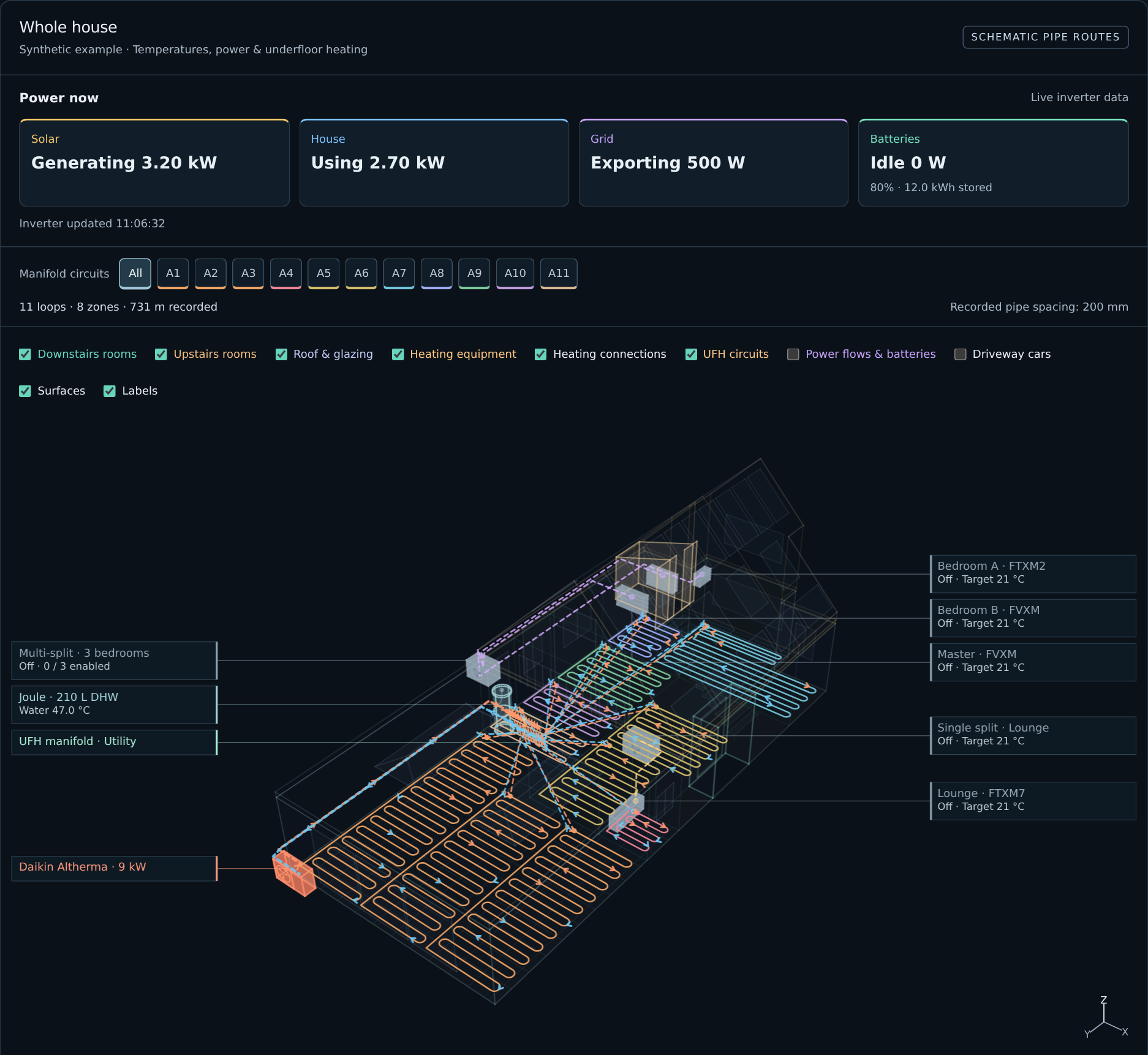
The actual app interface using sample readings and anonymised room labels. The underfloor pipe routes are schematic. Open the screenshot to inspect the detail.
Those rooms have quite different characteristics. The lounge has porcelain flooring, large roof lanterns and rear glazing; other areas have carpet. Some thermostats are located outside the rooms whose circuits they control. The upstairs bedrooms are outside the downstairs underfloor heating manifold altogether. A useful model needs to preserve those differences.
The drawing also has limits. Concealed pipe routes are schematic, and a heat pump being set to heating mode doesn’t prove its compressor is running. Where the view infers operation from the available settings, it labels that inference. This matters when trying to understand whether a temperature change followed actual heating, stored warmth, or something else.
The virtual house provides the physical context for developing the thermal model. The temperature predictions themselves are learned from recorded observations; the 3D geometry isn’t a detailed simulation of heat flow through every wall.
Learning how the house heats and cools
Environmental Controls records the changing room, floor and outdoor temperatures alongside the heating settings. A warm floor beneath cooling room air is a different starting point from a room where both have already cooled down. The local model learns how combinations like these have developed over time, using up to 21 days of the house’s own history.
Predicting the next fifteen minutes
For each modelled room, the app fits two small regressions: one predicts the change in air temperature over the next 15 minutes, and the other predicts the change in floor temperature. Each prediction is a weighted sum of inputs, plus a baseline term called the intercept:
Predicted temperature change = intercept + sum of each scaled input × its learned weight.
There are twelve inputs, plus the intercept, so each regression has only thirteen coefficients. The air and floor regressions use the same inputs but learn different weights.
| Input group | What goes into the model |
|---|---|
| Heat transfer | Outdoor minus room temperature; floor minus room temperature |
| Heating demand | Altherma target minus its hallway reading; hallway reading minus the room being modelled |
| Recent trends | The room air and floor temperature changes over the previous interval |
| Daily pattern | Sine and cosine of UTC time of day, giving a smooth 24-hour cycle |
| Sunshine proxy | PV generation, its recent change, and PV multiplied by the sine and cosine terms |
The temperature differences help describe the conditions under which heat moves into or out of a room. The trends give the model some memory: a floor which is still warming can behave differently from one at the same temperature which is cooling. PV is a proxy for sunshine, and its interactions with time of day let each room learn a different daily response. These are learned associations; they don’t measure heat loss through a particular wall.
The floor input is a local probe where one applies: the reference model uses the hallway floor sensor. The upstairs bedroom model uses an average of the included downstairs floors, providing context about stored warmth elsewhere in the house. Its floor prediction refers to that downstairs average.
Why use ridge regression
Ordinary linear regression chooses weights which minimise squared prediction errors. Household measurements often move together: sunshine, outdoor warmth and room temperature can all rise during the day. With correlated inputs, an unrestrained fit can assign large, opposing weights which explain the training data but are sensitive to noise. The ridge penalty discourages large weights, helping make that fit more stable.
The implementation first centres each input on its training mean and scales it by its training standard deviation, with a small minimum scale for nearly constant inputs. That puts temperature differences, PV power and time terms on comparable scales. It then minimises this objective, separately for air and floor:
Mean squared prediction error + 0.005 × sum of squared input weights.
The intercept is left out of the penalty. The strength, 0.005, is fixed before validation. This still lets an informative input influence the forecast, whilst discouraging a fragile combination of very large coefficients.
The calculation is implemented directly in Rust, solving two small systems of equations locally. Training runs at startup and every six hours after a successful training pass while learning is enabled. The controller can therefore evaluate every minute using the fitted model without retraining it each time.
Training and checking against later observations
Training uses completed 15-minute intervals with adequate sensor coverage, the Altherma in heating mode, and all four air-to-air units off. Each sample needs three consecutive observations: previous, current and next. The first two supply the inputs; the difference between current and next supplies the outcome to learn. Missing intervals aren’t joined together, large temperature jumps are rejected, and a target change during the outcome interval excludes that sample.
Sensor quality matters as much as the fitting method. The lounge uses its Daikin air reading because the WarmUp air probe is susceptible to local solar gain. A model needs at least 288 usable samples spanning three days, with a usable interval within the last 24 hours, before it can proceed.
To check the fit, the app trains on the oldest 80% of usable samples and tests forecasts against later observations. It rolls predictions forward over uninterrupted periods with a fixed target, without feeding in the future temperatures or measured sunshine. Validation uses a solar profile learned from the earlier data; it doesn’t retrospectively test Solcast’s forecast accuracy.
For two-hour forecasts, it needs at least six test windows, mean absolute air error no greater than 0.5°C, and floor error no greater than 0.75°C. It also compares the air forecast with persistence: simply assuming the starting temperature stays unchanged. The permitted air error is at most 1.1 times that baseline’s error, plus 0.03°C. This stops a complicated forecast being accepted merely because a slowly changing room is easy to predict. Six-hour forecasts need their own validation; passing at two hours doesn’t authorise a longer forecast. After these checks, the operational coefficients are refitted using all the usable samples.

How the local model is fitted, checked and used. Training learns from observed changes; a forecast feeds its own predicted temperatures into later steps. The separate controller decides whether any target change is permitted. Open the diagram to view it full size.
Building a forecast and deciding when to trust it
A forecast starts with the latest readings and recent trends, then holds a candidate Altherma target constant. The model predicts the next air and floor changes, adds them to the current temperatures, and uses those predicted temperatures and trends as the next step’s inputs. Eight steps give a two-hour forecast; twenty-four give six hours when that horizon has passed validation.
During this process, outdoor temperature stays at its latest reading and the initial difference between the reference sensor and the modelled room is held constant. Solar input advances using a sufficiently complete Solcast forecast already in Home Assistant, or a profile learned from past PV generation and adjusted for current conditions. Predictions which become unstable or require excessive extrapolation are rejected.
The model also carries an error allowance derived from the 90th percentile of its absolute errors on later test observations, with a minimum and a sensor margin. That gives the controller some allowance for mistakes; it isn’t a calibrated guarantee that 90% of future readings will fall inside a band.
Finally, being able to forecast is different from knowing how to change the heating. Comparing altered targets needs additional evidence: a useful spread of past targets, at least four separated change episodes, observations at both lower and higher settings, and a plausible learned response. Even then, this remains observational evidence. The model supports the bounded controller described below, which can fall back to measured comfort rules when the learned response isn’t ready.
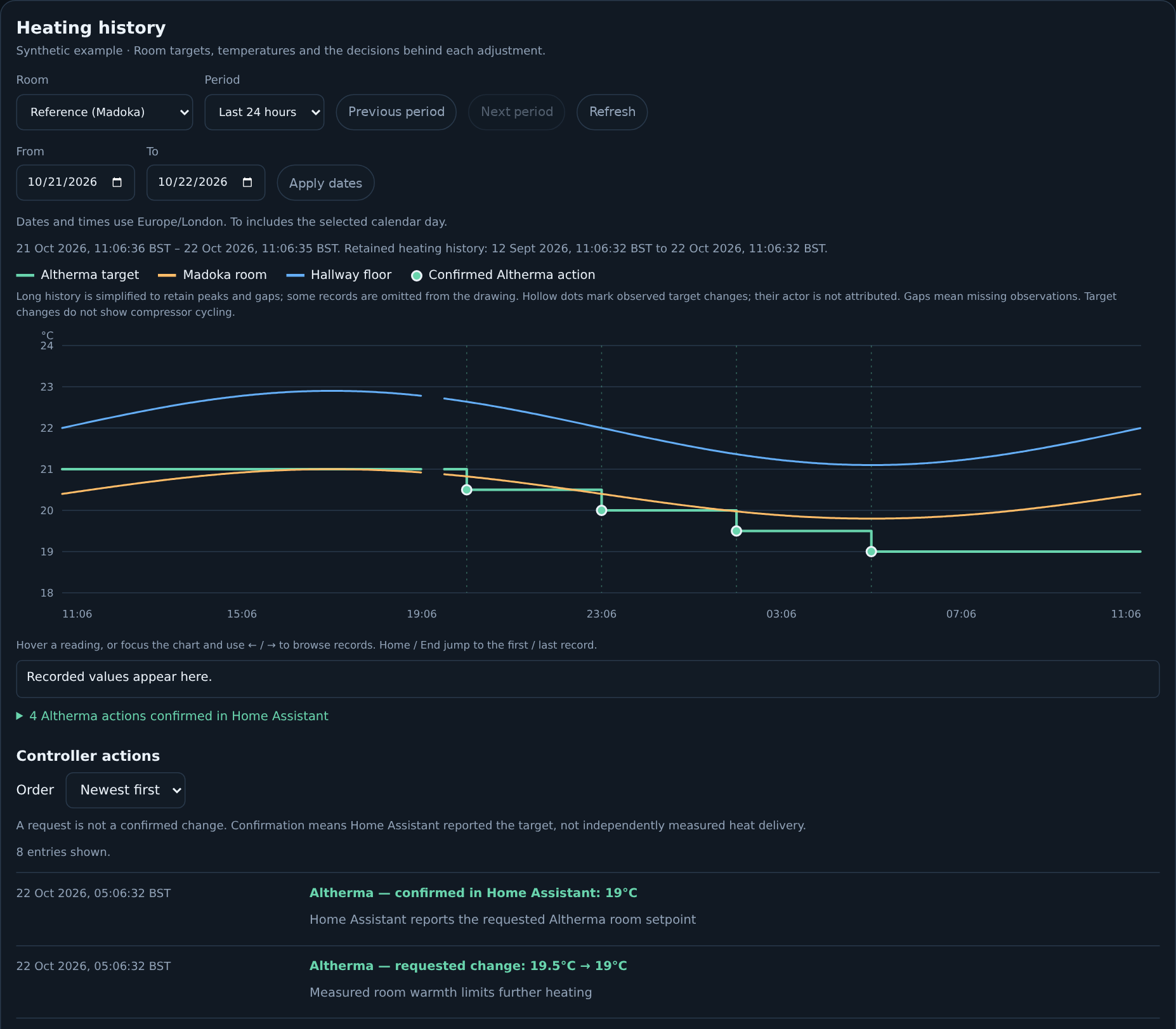
The heating view with synthetic readings for illustration, rather than a record of household activity. Open the screenshot to inspect the detail.
Weather compensation and our heating curve
The Altherma already has an important part of the control problem built in. Weather compensation adjusts its target flow temperature — the temperature of the water leaving the heat pump for the heating system — according to the outdoor temperature. Colder weather means greater heat loss from the house, so it calls for warmer water. In milder weather, the water target falls. A heating curve describes that relationship, helping the heat supplied match the building’s changing needs. Energy Saving Trust’s explanation describes how this supports steady operation.
My saved Altherma configuration from 2 October 2026 uses a two-point curve: 34°C water at −5°C outdoors, falling to 25°C water at +13°C outdoors. Between those points it follows a straight line. At 0°C outside, for example, the base target is 31.5°C; at +5°C it is 29°C.
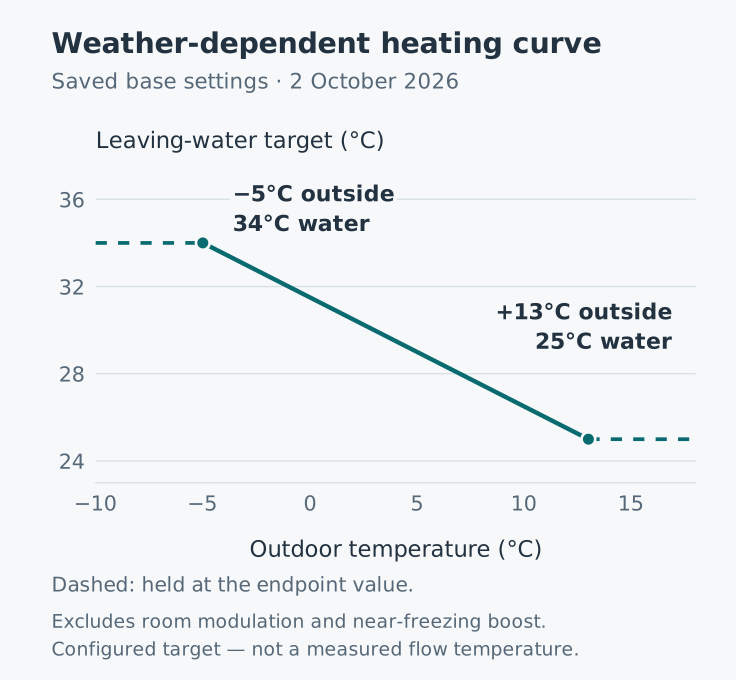
My saved base weather-dependent heating curve. This is a configured target, not measured flow temperature; room modulation, the near-freezing boost and operating limits are excluded. Open the chart to view it full size.
The base target stays at the endpoint values beyond that range, before other adjustments and operating limits. My saved settings also enable a 2°C boost around freezing and room-based adjustment of the water target, so the line isn’t the final target in every circumstance. These are the saved heating settings, rather than a live measurement or the domestic hot-water target.
Lower flow temperatures reduce the temperature lift the heat pump has to achieve, generally allowing it to deliver more heat per unit of electricity. Underfloor heating’s large surface area helps it deliver useful warmth with relatively cool water. The aim is a low temperature which still supplies enough heat to keep the rooms comfortable. Daikin’s efficiency guidance explains the relationship between flow temperature, emitters and efficiency.
Keeping the heating circuits open
I run the water-based heating effectively open-loop at the individual room controls. The downstairs WarmUp thermostats are set slightly above the temperatures I actually want, so they normally keep the manifold ports for each room open. This lets water continue circulating through the floors whilst the heat pump regulates the heat being supplied. The thermostats can still close a room’s ports if it gets too warm.
Balancing the flow is an important part of making this work. I’ve balanced the UFH manifold’s lockshield valves with the different pipe-run lengths in mind, to distribute water across the loops. The upstairs radiators have also been balanced so they don’t take a disproportionate share of the available flow and heat at the expense of the downstairs floors.
Here, open-loop describes how I operate the room circuits. The Altherma’s weather compensation and hallway temperature feedback remain active, and Environmental Controls still uses the house’s sensor readings to make its limited adjustments to the room target. Keeping the heat distribution steady gives those controls a more consistent system to work with.
Modulation and avoiding unnecessary cycling
Modulation means varying output to suit demand. An inverter-driven compressor can change speed, allowing the heat pump to supply less heat as demand falls and more as it rises. That gives it a way to keep running at a lower output whilst the house needs a steady supply of warmth, as described in Daikin’s guide to inverter technology.
Daikin also uses modulation for a related control feature: adjusting the leaving-water target according to the difference between the desired and measured room temperatures. My saved settings enable this, with up to ±7°C adjustment to the water target. That is a water-temperature adjustment, not a seven-degree allowance on room temperature. The hallway sensor therefore influences both the heating demand and the water target. The distinction is described under leaving-water temperature modulation in Daikin’s installer guide.
Long, steady compressor runs can avoid the efficiency losses and wear associated with frequent short starts and stops. Research commissioned by DECC examines the performance effects of rapid cycling. There is a lower limit to how far the compressor can reduce its output, though. In mild weather, the house may need less heat than the heat pump can supply at its minimum output, so some cycling can still be necessary. The goal is to avoid unnecessary short cycling whilst supplying the heat the house needs.
Keeping the room circuits open helps here too. It maintains circulation through more of the system and keeps more heating surface available to release heat. That reduces the abrupt drop in load which can happen when several room valves close, supporting longer compressor runs and reducing one cause of avoidable cycling. Heat Geek’s explanation of zoning describes why this matters for a modulating heat pump.
This is why I want to avoid over-controlling the system. If the software keeps raising the room target, waiting for the floor to respond, then lowering it sharply, it can repeatedly create and withdraw heat demand, encouraging avoidable starts and stops. Gentle adjustments give the heat pump’s own controls time to settle. Daikin similarly recommends avoiding large, frequent temperature changes to support efficient operation.
Environmental Controls adjusts the room target while leaving this weather curve and the native compressor controls in place. Its command budget limits how often my software intervenes; it doesn’t measure or guarantee compressor run length. Seeing the actual runs more clearly is one reason I want the additional ESPAltherma monitoring described below.
Turning that understanding into thermostat decisions
Environmental Controls evaluates the house every minute, but makes changes slowly. Its job is to decide whether to raise the Altherma’s common room target by one step, leave it alone, or lower it. Daikin’s own thermostat logic, weather compensation and equipment protections manage heat delivery. Holding a target can still mean the heat pump is running.
The operating mode is an explicit choice. In observe, the app records and explains its decisions without sending commands. In adaptive, it can act after all the required checks pass. Off stops heating decisions and model training whilst leaving observation and the display running. Improving model confidence doesn’t automatically enable control.
Choosing a target
First, the app needs a connected Home Assistant, valid required readings, and an Altherma already in heating mode with its target inside the permitted 19–21°C range. Missing, unavailable or stale inputs prevent an Altherma adjustment. The app doesn’t switch heating back on after someone turns it off.
The heating policy then works through these priorities:
- Respond to measured overheating. Excess warmth at the reference sensor, in the bedroom or in the floors can request a one-step reduction. At the lower target limit, the controller holds.
- Apply evening coasting or the night setback. If the target is above the current night goal, ease down one step towards it.
- Check for overheating ahead. A forecast can justify easing back only when its measured prediction skill is good enough and the predicted excess remains after allowing for its observed error.
- Choose whether a further change is useful. When the critical models have enough evidence about responses to previous target changes, compare one step lower, the current target, and one step higher. The score weighs comfort, overheating, heat demand and the cost of making a change. A change has to improve sufficiently on holding the present target.
If that learned comparison isn’t supported by the data, the app uses a conventional comfort policy. It works towards the current day or night goal using measured temperatures and recent trends. It can wait when the room is already warming, heat is still entering the floor, or sunshine looks likely to cover a small temperature shortfall. Conflicting air-to-air operation can also prevent an increase. This is a set of measured rules, and the interface identifies it as a fallback. The learned score also estimates comfort and heat demand; it doesn’t measure electricity savings or optimise a tariff.
From a proposal to a confirmed change
A useful proposal still has to pass the command limits. Each adjustment is one native temperature step — 0.5°C or 1°C, depending on what the device reports — within the permitted target range. There must be at least three hours between completed attempts, with at most eight attempts in a rolling 24 hours. A target change made outside Environmental Controls creates a twelve-hour hold, giving manual adjustments and other controls time to take effect.
The state machine below is a simplified view of this Altherma control path. The implementation keeps the operating mode, comfort plan and command journal separately, so a morning recovery plan can coexist with a command hold.

The Altherma command lifecycle. Waiting never guarantees a later adjustment: the controller checks the house again before acting. Open the diagram to view it full size.
Before dispatch, the app saves the intended change in SQLite, then reads the live Home Assistant state again. It checks that the device, mode, target and supported step still match its expectations, and that exposed equipment protections permit the change. A newer target causes rejection. If the checks pass, it sends one command and checks for the requested target in Home Assistant’s reported state.
A confirmed change starts the normal waiting period. A rejected attempt, including a refusal before sending, adds a twelve-hour action hold. An uncertain result leaves the command pending until I check the state and explicitly acknowledge it; there is no timed retry. Failed attempts count towards the budget, and restarts preserve pending commands, holds and attempt history. Confirmation means the target was reported back, so I still need temperature history and, eventually, compressor telemetry to judge the physical result.
Evening coast and morning recovery
The comfort plan has four phases: day, evening coast, night setback and morning recovery. I want to use stored warmth to avoid heating through the night, then begin early enough for warm floors in the morning. Before bedtime, sufficiently warm floors and comfortable, stable air can justify moving towards the night goal early. The night goal also allows the house to receive heat if it becomes too cold.
Morning recovery currently uses the remaining target steps and the three-hour spacing to calculate its earliest possible window. The lead is capped at six hours and the window cannot begin until at least three hours after bedtime. Entering that window only permits consideration of an increase: the reference room must show a temperature shortfall and suitable recent trends, with checks for warmth still stored in the floors.
Once recovery begins, its goal survives a restart, but every further increase must pass those checks again. Learning a reliable floor warm-up time remains part of the experiment. I also need to check that recovery stays gentle: fewer heating hours don’t automatically mean less electricity if the house then needs hotter water and harder running to catch up.
Optional bedroom air-to-air cooling has its own control state and respects whether a cooling session belongs to this app or was started elsewhere. When it proposes a cooling action, that takes priority and the same evaluation doesn’t also send an Altherma adjustment. Verified cooling can let downstairs recovery proceed without the bedroom’s warmth blocking it, whilst the other heating checks remain in force.
More detail from the heat pump
I also plan to run ESPAltherma on an ESP32 inside the Altherma 3. It reads operating metrics through the heat pump’s serial connection, converts the readings into JSON and publishes them over MQTT for Home Assistant to pick up. The readings are polled at regular intervals, giving me a more direct, near-real-time view of what the heat pump is doing.
That should provide useful extra feedback for Environmental Controls: more detail about the equipment’s operation to set alongside the room and floor temperatures and the target changes it has requested.
So far, the practical stumbling block has been getting the M5Stack ESP32 to connect reliably to our Wi-Fi network. Being inside a metal box outside doesn’t help! This part is still a work in progress, so those additional readings aren’t yet an input to the controller.
An encouraging start
This is still an ongoing experiment, but I’m already seeing positive signs. Bringing the room and floor readings together gives me a much clearer understanding of how the house responds. I can examine what happened after a change, work with Codex to refine the software, and then see how the next version behaves in the house. That is already a useful improvement in how I understand and manage our heating.
My understanding is that Octopus has addressed part of this same problem with its own Cosy heat pumps. The system includes up to four Cosy Pods: separate room temperature and humidity sensors which can be distributed around the home. Its user guide describes choosing one primary Pod as the thermostat sensor for each heating zone, whilst the other Pods continue to report their readings. That gives the homeowner a view of several rooms and a choice of where the system takes its reference temperature.
Our current Daikin Altherma 3 setup doesn’t offer that same built-in arrangement; its room feedback still comes from the hallway. Environmental Controls lets me bring the wider set of sensors already in Home Assistant into the decisions we make about heating, alongside the floor’s stored warmth and the house’s recent history.
There is more to learn about morning recovery and the compressor’s behaviour, but I now have a practical way to observe, adjust and improve the system. The heat pump was already an overwhelmingly positive change for our home, and this work is helping me make better use of it. For me, that is an encouraging result from the original experiment: using AI to build useful software, then letting what happens in the real world guide its next improvement.